
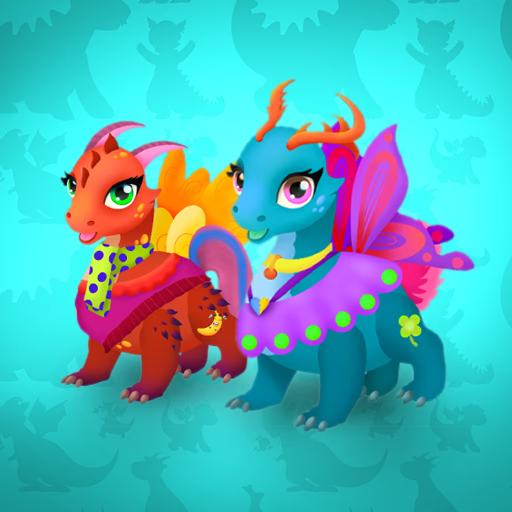
बेबी ड्रेगन
बेबी ड्रेगन एक रचनात्मक ड्रेस-अप गेम है जहाँ आप दो प्यारे ड्रैगन साथियों को डिज़ाइन और कस्टमाइज़ कर सकते हैं। यह कैज़ुअल ब्राउज़र गेम आपको एक सरल पॉइंट-एंड-क्लिक इंटरफ़ेस का उपयोग करके शरीर के रंग और पंखों की शैली से लेकर आँखों के आकार और सहायक उपकरणों तक सब कुछ बदलने की सुविधा देता है। यह उन खिलाड़ियों के लिए एकदम सही है जो मेकओवर गेम,
काल्पनिक जीवों से प्यार करते हैं, और किसी भी HTML5-संगत डिवाइस पर सरल, आरामदायक गेमप्ले के माध्यम से अपनी रचनात्मकता व्यक्त करना चाहते हैं।
कौन से कस्टमाइज़ेशन विकल्प उपलब्ध हैं?
आपके पास अपने ड्रेगन को अद्वितीय बनाने के लिए विकल्पों का एक विशाल पैलेट है। शरीर के लिए एक प्राथमिक रंग और पेट के लिए एक एक्सेंट रंग चुनकर शुरू करें। वहाँ से, आप आँखों, सींगों,
पंखों के आकार और पूंछ के डिज़ाइन के लिए दर्जनों विकल्पों के माध्यम से साइकिल चला सकते हैं।
प्रत्येक श्रेणी अलग-अलग शैलियों की पेशकश करती है, जिससे आप एक भयंकर, प्यारा या राजसी ड्रैगन तैयार कर सकते हैं। अंतिम स्पर्श सहायक उपकरणों के रूप में आते हैं, जिससे आप अपनी रचना को पूरा करने के लिए थोड़ा आकर्षण जोड़ सकते हैं।
एक गतिशील जोड़ी डिज़ाइन करें
बेबी ड्रेगन में, आप केवल एक प्राणी को स्टाइल नहीं करते - आपको दो डिज़ाइन करने को मिलते हैं! यह सुविधा आपको थीम वाली जोड़ियाँ बनाने की अनुमति देती है। क्या आप उन्हें मेल खाते रंगों और सींगों के साथ समान जुड़वाँ बनाएँगे?
या क्या आप उन्हें विपरीत के रूप में डिज़ाइन करेंगे, जैसे आग का ड्रैगन और बर्फ का ड्रैगन?
आप कस्टमाइज़ेशन प्रक्रिया के दौरान किसी भी समय दो ड्रेगन के बीच आसानी से स्विच कर सकते हैं। जब आप समाप्त कर लें,
तो आप एक ऐसी पृष्ठभूमि चुन सकते हैं जो आपकी जोड़ी को पूरक करती है और अपने काम की प्रशंसा कर सकते हैं।
बेबी ड्रेगन अनब्लॉक - मुफ्त ब्राउज़र गेम
आप बेबी ड्रेगन को सीधे अपने वेब ब्राउज़र में मुफ्त में खेल सकते हैं। किसी डाउनलोड या इंस्टॉलेशन की आवश्यकता नहीं है। क्योंकि यह एक हल्का HTML5 गेम है,
यह अधिकांश उपकरणों पर चलता है और स्कूल या कार्य नेटवर्क पर एक्सेस किया जा सकता है जो गेमिंग की अनुमति देते हैं, जिससे जब भी आप रचनात्मक महसूस करें, डिज़ाइन करना शुरू करना आसान हो जाता है।
बेबी ड्रेगन में लक्ष्य अपनी रचनात्मकता का उपयोग करके दो बेबी ड्रेगन को पूरी तरह से कस्टमाइज़ करना है। आप एक अद्वितीय जोड़ी बनाने के लिए उनके रंग, शारीरिक विशेषताओं और सहायक उपकरण बदल सकते हैं।
गेम पूरी तरह से आपके माउस से नियंत्रित होता है। 'आँखें,' 'पंख,' और 'रंग' जैसी विभिन्न कस्टमाइज़ेशन श्रेणियों के माध्यम से ब्राउज़ करने के लिए बाएं क्लिक का उपयोग करें। अपने ड्रैगन पर लागू करने के लिए विशिष्ट विकल्प पर क्लिक करें।
पहले, चुनें कि आप दो ड्रेगन में से किस पर काम करना चाहते हैं। प्रत्येक मेनू के माध्यम से जाएं, अपनी पसंदीदा शैलियों का चयन करें। पहले ड्रैगन को समाप्त करने के बाद,
दूसरे पर स्विच करें और इसे डिज़ाइन करें। जब दोनों पूरे हो जाएं, तो आप उनके लिए एक अंतिम पृष्ठभूमि चुन सकते हैं।
गेम टिप्स
अपनी जोड़ी का समन्वय करें - अपने दो ड्रेगन के लिए एक थीम बनाने की कोशिश करें, जैसे आग और बर्फ, दिन और रात, या बस उन्हें मेल खाते जुड़वाँ बनाना।
आँखों पर ध्यान दें - आँखों की शैली और रंग आपके ड्रैगन के व्यक्तित्व को पूरी तरह से बदल सकते हैं। यह देखने के लिए विभिन्न आँखों के साथ प्रयोग करें कि क्या आप चाहते हैं कि आपका ड्रैगन प्यारा, भयंकर या नींद में दिखे।
रंगों को मिलाएं और मैच करें - शरीर, पेट और पंखों के लिए असामान्य रंग संयोजनों की कोशिश करने से डरो मत। कभी-कभी सबसे अप्रत्याशित जोड़ियां सबसे यादगार ड्रेगन बनाती हैं।
अंत में एक्सेसराइज़ करें - पहले शरीर के अंगों और रंगों को चुनें। हार और धनुष जैसे सहायक उपकरणों को अंत के लिए बचाएं ताकि आपके द्वारा स्थापित समग्र डिज़ाइन को पूरक किया जा सके।
दृश्य बदलें - डिज़ाइन करने के बाद, अपने ड्रेगन की थीम के अनुरूप एक पृष्ठभूमि चुनें ताकि एकदम सही अंतिम तस्वीर बन सके।